

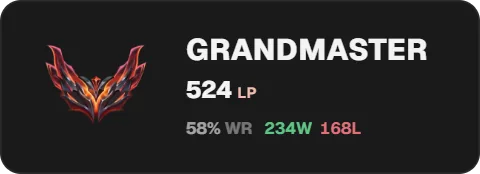
Add the LoL rank widget to OBS
On a computer, open the Twools editor, add the LoL rank widget and pick one of the eight layouts.
In "Source", download Twools Buddy and open it (get past the Windows warning), then click "Generate a connection code" and paste it into Buddy.
In Buddy's "League" tab, tick the reading and keep the League client open; then, in "Source", pick the ranked queue, Solo/Duo or Flex.
Click "Overlay link", copy your link and paste it into a Browser Source in your streaming software, sized to your canvas.
On your phone, open the Control Room: the card shows the LP won since the session started, and "New session" resets that tally.
Features
- Tier, division, LP, wins, losses and win rate, in solo/duo or flex
- Rank emblem, gem, or animated wings around the profile icon
- LP gained or lost over the current session
- Eight layouts, including a summoner card with your Riot ID and level
- Automatic updates by Twools Buddy, right after each game
The settings
| Setting | What it changes |
|---|---|
| Layout | Eight designs: Classic, Minimal, TV banner, Today's climb, Season, Vertical, Summoner card and Crest. |
| Ranked queue | Solo/Duo by default, or Flex. Buddy reads both; the widget shows the chosen queue, and the evening's tally only counts its games. |
| Source | The Twools Buddy download, "Generate a connection code" and the list of connected PCs, with the account read and how long ago. |
| Summoner card | What shows to the right of your Riot ID: "Rank and LP", "Rank and wins" (the win rate) or "Nothing"; the profile icon as a disc or a rounded square. |
| Rank icon | In "Customize": Emblem, Gem or Animated wings (around the profile icon, on Crest, Summoner card and Vertical), and its size, from 50 to 400%. |
| Visible elements | Removes or brings back the win rate, the season record, the LP change, today's tally or the "Today" and "Season" captions, depending on the layout. Where the evening's tally shows, the last game's LP change is off by default; on Vertical, so are the win rate and today's wins and losses. |
From the Control Room
On your phone, the widget's card tells the story of your evening: the LP won or lost since the session started in very large type, the record in wins and losses, then your starting rank and your current rank with their emblems. A line gives your current LP, how long ago and the PC that sent it; "Flex" shows when you follow that queue. "New session" resets the tally after a confirmation: only the games played afterwards count. The eye shows or hides the widget, and the star plays the burst when the animation style has one. The card reads nothing by itself and does not switch queues: Buddy sends the rank, and the queue is picked in the editor.
Ways to use it
A ranked evening
Today's climb puts your starting rank next to your current rank, with the LP won and the record: chat follows the climb game after game, without you typing a number.
A promotion night
Crest shows the rank emblem in large size, like the client's ranked screen. When Buddy sends the new tier, the emblem changes, and the Control Room shows the old rank and the new one side by side.
Solo/Duo and Flex
Two LoL rank widgets in the same overlay, one on Solo/Duo, the other on Flex: Buddy sends both ranks, each widget shows its own. Hide the one you do not need with a tap on the eye.
Compared with the most common method
A rank overlay from a stats website, pasted as a browser source
| Aspect | With Twools | The other method |
|---|---|---|
| Setup | Twools Buddy paired with a code, a widget in the editor, an overlay link in a Browser Source. | A page generated by the site from your Riot ID and region, pasted as a browser source. |
| Where the data comes from | The League client open on your PC, read by Buddy at the end of each game. | The site's servers, which query Riot at their own pace. |
| Evening tally | LP won, wins and losses since the session started, reset from the Control Room. | Depends on the site: often the rank alone, sometimes the day's LP. |
| Style | Eight layouts, style presets, and the colours, fonts and animations of the rest of your overlay. | The themes the site offers, more or less adjustable. |
| During the stream | The Control Room, on a phone, shows the evening and hides the widget. | Nothing to control: the page runs on its own in OBS. |
| Requirements | A Twools account, and streaming software that accepts a browser source (OBS, for example). For the data: Twools Buddy on the Windows PC running the League client. | OBS, and your Riot ID typed on the site; no software on the gaming PC. |
When the other method makes sense
If you play on a Mac, on a Korean account, or would rather install nothing on your gaming PC, a stats website does the job: it reads your rank from your Riot ID alone. The widget becomes useful when you want your ranked evening in numbers, a style that matches your overlay and the Control Room on your phone.
LoL rank: frequently asked questions
How do I add a League of Legends rank overlay to my stream?
Add the LoL rank widget to your overlay. Install Twools Buddy on the PC you play on, paste the connection code generated in the editor, Source section, then tick the reading in Buddy's "League" tab. Then paste your overlay link into an OBS browser source.
Does the rank update after each game?
Yes. Twools Buddy re-reads your rank in the League client right after each game, when the LP come in, and sends it to your overlay, with nothing to do on your side. During the game, nothing moves. The League client must be open on your PC.
Is flex queue supported?
Yes. You pick Solo/Duo or Flex in the editor, Source section. Buddy reads both queues; the widget switches to the new one the next time Buddy sends data, after your next game at the latest: until then it keeps the previous queue's rank. The evening's tally only counts games in the chosen queue.
Do I need to install software or give my Riot password?
You need Twools Buddy, the Twools app for Windows 10 and 11: it reads your rank in the League client open on your PC. No password is asked for, and Buddy never sees yours.
Does Twools Buddy work with a Korean account?
Not for now. Twools Buddy does not read accounts on Korean servers, in line with Riot's rules for third-party apps.
What does the LoL rank show when the League client is closed?
The last rank received stays on screen: Buddy sends nothing until the League client is open and signed in to your account. Before Buddy first sends anything, the widget stays unranked, at 0 LP.
How does my LoL ranked evening tally start again from zero?
In two ways. The tally returns to zero as soon as three hours have passed since your last ranked game, and your next ranked game opens a new session; an evening that runs past midnight stays a single session. In the Control Room, "New session" also resets the tally, after a confirmation: only the games played afterwards count.
Does the LoL rank widget show my placements?
No. During placements, the widget shows what the League client reports: "UNRANKED" at 0 LP. Your rank arrives when placements end; for a reliable evening tally, finish your placements, then start a new session from the Control Room.
Is the LoL rank shown in English?
The tier is written in English capitals, GOLD II or DIAMOND I, on every layout. Other words follow the language the editor was in when you added the widget, and "On-air language", in the Display screen, changes it. In English: records in W and L (142W 128L), the win rate as "% win rate", "Today", "Season", "LP today", "Level".