

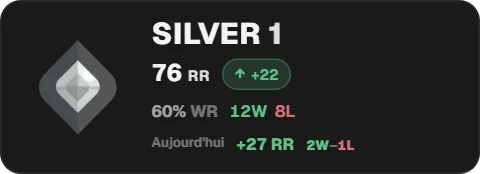
Add the Valorant rank widget to OBS
On a computer, open the Twools editor, add the Valorant rank widget and pick one of the eight layouts.
In "Source", download Twools Buddy and open it (get past the Windows warning), then paste in the code from "Generate a connection code".
In Buddy's "Valorant" tab, tick "Read my Valorant rank from this PC's Riot client", and keep the Riot client open and signed in.
Click "Overlay link", copy your link and paste it into a Browser Source in your streaming software, sized to your canvas.
Your rank arrives with Buddy's first reading, then after each game. In the Control Room, on your phone, the eye shows or hides the widget.
Features
- Competitive tier, RR and the official rank emblem
- RR gained or lost on the last ranked game, and the session's net
- Session wins and losses, even past midnight
- Eight layouts, including a lower third, a large crest and the act record
- Nothing on air until Twools Buddy has sent your rank
The settings
| Setting | What it changes |
|---|---|
| Layout | Eight designs: Classic, Minimal, TV banner, Today's climb, Crest, Vertical, Player card and Act. Act sums up the act: wins, losses and win rate. |
| Source | The Twools Buddy download, "Generate a connection code" (a single-use code that expires) and the list of connected PCs, online or offline. |
| Visible elements | Shows or removes the Riot account, the RR, the last game's change, the win rate, the act record, today's record or the captions, depending on the layout. The emblem and the rank always stay. |
| Looks | Twools' full styles: background, frame, font, effects. The tier colour, on the emblem and the division, always follows your rank. |
| Rank icon | In "Customize", its size, from 50 to 400% of what the layout plans: enough to make the emblem the centrepiece. |
| Customize | Font, colour and text effects, element by element: rank, RR, change, win rate, records, account. "Whole widget" sets the background, the frame and the 3D tilt. |
| Animations | The entrance, the change at every rank, when a ranked game arrives, the exit, the burst; living content: Float, Sheen, Surge or Interference on the emblem. |
From the Control Room
On your phone, the Valorant rank card sums up your session: the RR gained or lost and your wins and losses in large type, then your rank, your RR and the act record, with your leaderboard place when you have one. When a ranked game arrives while the card is open, a line gives the time, the RR and the map played. At the bottom, the PC sending the data and when it was last read. The eye shows or hides the widget, and the star plays the burst when the animation style has one. The card is read-only: it changes neither the rank nor the layout, and does not restart Buddy.
Ways to use it
The evening climb
The Today's climb layout puts your rank at the start of the session next to your current rank, with the net RR in large type, captioned "RR today", and your wins and losses, with the game count. A promotion shows: two different emblems.
A rank in the corner
Minimal fits on one line, Vertical in a portrait rail: the rank stays on screen for the whole stream and updates after each ranked game, with nothing for you to do.
A stream past midnight
The record follows your session, not the calendar: until a break of more than three hours between their starts, the ranked games at 11 pm and 12:30 am count together. On your phone, the Control Room card shows it in large type.
Compared with the most common method
A rank overlay from a third-party stats website pasted into a browser source
| Aspect | With Twools | The other method |
|---|---|---|
| Where the rank comes from | Twools Buddy reads the Riot client signed in on your PC; no Riot ID to type. | The website finds your account from your Riot ID and a sign-in with your Riot account on the website to make your profile public. |
| Updates | After each game, when Buddy reads the Riot client again. | At the website's pace, as it reads your account on its side. |
| Session record | The net RR, wins and losses of the session, which does not reset at midnight. | Depends on the website: a daily record, a session record, or none. |
| Style | Eight layouts, style presets, font and colour element by element, animations. | The themes and options the website offers. |
| During the stream | The Control Room, on a phone, shows your session and hides the widget. | In OBS, on the streaming PC: hide the source. |
| Requirements | A Twools account, and streaming software that accepts a browser source (OBS, for example). For the data: Twools Buddy on the Windows PC running the Riot client. | OBS, your Riot ID, and a sign-in to your Riot account on the website to make your profile public. |
When the other method makes sense
If you do not want an app on your gaming PC, or if you want to show the rank of a player whose profile is public, a stats website's overlay does the job: a Riot ID is all it needs. The Twools widget becomes useful when you want a rank that matches the rest of your overlay, your session record and a glance from the Control Room.
Valorant rank: frequently asked questions
How do I add a Valorant rank overlay to my stream?
Add the Valorant rank widget to your overlay, download Twools Buddy on your Windows PC and pair it with the code from the Source section. In Buddy's "Valorant" tab, tick the Riot client reading. Then paste your overlay link into an OBS browser source.
Does the Valorant rank update during the stream?
Yes, after each game. When a game ends, Buddy reads the Riot client again and sends your rank and RR to the overlay; nothing moves during the game itself. Nothing to press in the Control Room, and the editor does not need to stay open.
Do I need to give my Riot password to show my Valorant rank?
No. Twools Buddy reads the account signed in to the Riot client on your PC: no login to type, no password, no key. It does not read the game's memory and sends nothing about other players. Twools is not affiliated with Riot Games.
Which Valorant rank is shown if I have not played this act?
The rank from the last act you played, marked "last act" next to the tier. The widget does not guess a placement, and the Control Room card says "Last act played" before the record.
What does the Valorant rank widget show before Buddy's first reading?
On air, nothing: the widget only appears with Twools Buddy's first reading, then it comes in with its animation. In the editor, a new widget shows a sample rank, Silver 1 at 76 RR, with no account name, so you can set the style; the Source section reads "Sample data".
Do I need to launch Valorant for Twools Buddy to read the rank?
No, the Riot client is enough, open and signed in to your account; Valorant only needs to have been launched once on that PC. With the Riot client closed, Buddy keeps the last data it read and the widget stays on your last rank.
How is the Valorant rank session record counted?
From the ranked games Buddy read: RR gained or lost, wins and losses. A break of more than three hours between the starts of two ranked games opens a new session, so a stream from 9 pm to 1 am stays whole. Buddy keeps the last ten ranked games: beyond that, the Control Room says the record covers them. On air, the caption reads "Today".
Does the Valorant rank widget follow a Riot account change?
Yes. Buddy reads the account signed in to the Riot client on your PC: if you sign in to another account, it starts over and sends that one. No Riot ID is typed in the editor, and the widget cannot follow another player's account.