

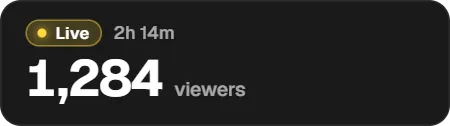
Add the Twitch viewer count widget to OBS
In the Twools editor, add the Twitch viewers widget and pick its layout.
In its drawer, connect your Twitch channel if you haven't yet.
Copy your "Overlay link" and paste it into an OBS Browser Source.
Go live: the number arrives at the first Twitch reading.
Features
- Viewer count read every minute by the server, even with the Control Room and editor closed
- Three layouts: a discreet corner, a show banner with the title and the game, a showcase for a big moment
- Stream peak and live time, then the last stream's once offline
- Offline line written your way, and an option to leave the screen when the stream stops
- A single Twitch hiccup never makes the widget leave or drop
The settings
| Setting | What it changes |
|---|---|
| Layout | A discreet corner, a show banner with the title and the game, or a showcase for a big moment. |
| Offline line | What shows instead of the number when you're not live. |
| Leave the screen when offline | The widget leaves the screen when the stream ends and comes back when it starts again. |
| On-air words | The widget's small words, like "viewers" or "Peak", written your way. |
| Look | The same presets as your other widgets: neon, paper, metal, glass and the rest. |
From the Control Room
The Control Room card shows the number, the stream's peak and length, the time of the last reading, and warns when no Twitch channel is connected. Use it to show, hide or animate the widget during the stream.
Ways to use it
A discreet number while you play
The Corner layout keeps the viewer count in a corner, out of the game's way, with the live state and its length.
A show's lower third
The Banner brings together the stream title, the game, the number and the stream's peak, like a TV set.
Compared with the most common method
An alert service's viewer counter
| Aspect | With Twools | The other method |
|---|---|---|
| Reading | By the Twools server, every minute, with no page open. | Depending on the service, by its servers or by a page you keep open. |
| Offline | Never a fake zero: a line of your choice and your last stream. | Often a zero, or the last number frozen. |
| During the stream | Show, hide or animate the widget from the Control Room, on your phone. | From the service's dashboard, when it allows it. |
| Look | The same presets and animations as your other Twools widgets. | The service's own style. |
When the other method makes sense
If your overlay already comes from an alert service and you only want a number, its counter is enough. The Twools widget helps when the number must share the look of the rest of your scene.
Twitch viewer count: frequently asked questions
How do I show my Twitch viewer count in OBS?
Add the Twitch viewers widget in the Twools editor, connect your Twitch channel from its drawer, then paste your overlay link into an OBS browser source. The number arrives at the first Twitch reading.
What does the widget show when I'm not live?
Never a number: a line of your choice, "Live soon" by default, with your last stream's peak and length. You can also have it leave the screen offline: it comes back by itself when the stream starts again.
Do I need to keep the Control Room or the editor open during the stream?
No. The Twools server reads your stream each time your overlay refreshes, every thirty seconds: OBS alone is enough.
Is the number exact?
It's the number Twitch gives for your stream, read every minute. It can therefore lag a minute behind the counter on the Twitch page.
Which channel does the widget read?
The Twitch channel connected in Twools, the one of your chat and alerts. Without it, your account's channel, if you signed up with Twitch.
What happens if Twitch doesn't answer?
The widget keeps its last number and the Control Room says so. A single missed reading never takes it offline: it takes two in a row.
Can I put several viewer counters in one scene?
Yes, each with its own layout and look, for example a corner while you play and a showcase for the end of the stream. They all read the same channel.