

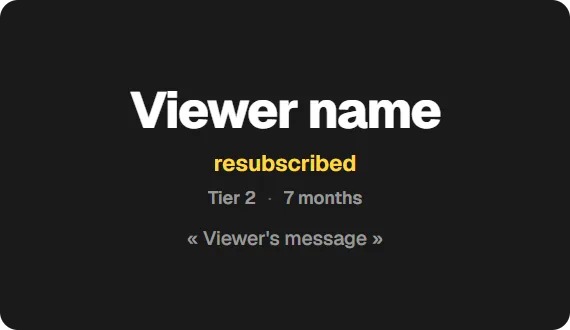
Add the Sub alert widget to OBS
On a computer, open the Twools editor, add the Sub alert widget and pick one of the nine layouts.
In "Alert", click "Connect Twitch", then write the sentence for each of the four cases and the tier words, and set the duration.
Click "Overlay link", copy your link and paste it into a Browser Source in your streaming software, sized to your canvas.
During the stream, keep the editor or the Control Room open with your account: that page receives the subscriptions and sends them to your browser source.
Before going live, "Test" in the Control Room picks at random a new sub, a resub or a received sub, in your name.
Features
- Separate sentences for a new sub, a resub, a gift of subs and its recipient
- Tiers 1, 2 and 3 shown with the label you choose
- Variables for the number of gifted subs and the number of months
- Nine layouts, including subtitles laid over the game and an always-visible "Latest subscriber" label
- Dedicated text when the gifter stays anonymous
The settings
| Setting | What it changes |
|---|---|
| Layout | Nine designs: Poster, Relay, Dedication, Ticket, Vertical, Subtitles, Pill, Portrait and Label, the only one that stays on air. |
| New subscription | The sentence after the username, "just subscribed" by default. A Prime sub uses it too. The default sentences follow the language the editor was in when you added the widget; "On-air language", in the Display screen, switches them. |
| Resubscription | "resubscribed" by default. From two months, the number of months is written separately, with the word of your choice, "12 months" by default. |
| Gifted subs | The gifter's sentence, such as "gifted 5 subs" for five: one marker writes the number, another adds the plural. |
| Subscription received | The sentence for each viewer who receives a gifted sub, "received a gifted sub" by default. |
| Anonymous gifter | The name shown when the gifter stays anonymous, "Anonymous" by default. |
| Tier word | Written next to the username: empty for tier 1, "Tier 2" and "Tier 3" by default. |
| Display duration | From 1 to 30 seconds, 5 by default, then the alert leaves. |
From the Control Room
On your phone, the card shows the alert on air: the username, what the viewer did, such as "New sub · tier 1" or "12-month sub · tier 1", their message and the time left. "Cut the alert" ends it without hiding the widget. At rest, the card recalls the latest alert. "Test" plays a sample alert in your name, "Disable" stops alerts until "Enable", even on the next stream, and the eye hides the whole widget. Sentences, tiers and duration are changed in the editor.
Ways to use it
A burst of gifted subs
A viewer gifts ten subs: their alert and those of the viewers who receive them play one after another. When the queue overflows, received subs are skipped, never the gifter.
A resubscriber's message
The Dedication layout puts up front the message the subscriber wrote when sharing their resub, with their number of months.
Your community's words
The four sentences, each tier word and the anonymous gifter's name can be rewritten: "just joined the crew" rather than "just subscribed", for example.
Compared with the most common method
A generic alert service added as a Browser Source
| Aspect | With Twools | The other method |
|---|---|---|
| Setup | A widget in the editor, your Twitch account connected, an overlay link in a Browser Source. | An account on the service, your Twitch channel linked, and its alert address in a Browser Source. |
| Receiving subscriptions | Through the editor or the Control Room open with your account: your browser source shows what that page receives. | Often through the service's servers, with no tab to keep open. |
| Cases covered | New sub, shared resub, gifted subs and received sub; Prime arrives as tier 1. | Depends on the service: usually the same, sometimes bits and donations. |
| Sound | None: the alert is visual. | Usually one sound per alert, which you pick. |
| Control during the stream | Test, cut or disable from the Control Room, on your phone. | From the service's dashboard. |
| Requirements | A Twools account, and streaming software that accepts a browser source (OBS, for example). For the alerts: your Twitch account connected. | An account on the service, linked to your Twitch channel. |
When the other method makes sense
If you want a sound, alerts for bits or donations, or alerts that arrive with no page open, an alert service does what Twools does not. The Sub alert widget becomes useful when the alert must carry your overlay's style and be run from your Control Room.
Sub alert: frequently asked questions
How do I add Twitch subscription alerts to OBS?
Add the Sub alert widget, connect your Twitch account in the editor and paste your overlay link into an OBS browser source. Keep the editor or the Control Room open during the stream to receive subscriptions.
Are resubs and gifted subs supported?
Yes. The alert recognises a new subscription, a resub with its number of months, and gifted subs with their count. Each case has its own sentence, which you can rewrite.
Are Prime subscriptions told apart from the others?
No. Twitch sends them as a tier 1 subscription, and the alert shows them that way.
Does the alert work if I close all my Twools tabs?
No. Subscriptions arrive through the tab where your Twitch account is connected, editor or Control Room. Keep it open during the stream: your browser source displays the alert, but does not receive it on its own.
How do I test the sub alert before going live?
In the Control Room, the "Test" button sends a sample alert to your overlay, in your name when your Twitch account is connected. Each click picks at random a new subscription, a 12-month resub or a gifted sub received by a viewer.
Why did a resub not trigger an alert?
Twitch only reports a resub when the subscriber shares it in your chat. If they don't, no alert goes out. When they do, the alert shows their months and, depending on the layout, the message they wrote.
What happens during a burst of gifted subs?
Twenty subs gifted at once make twenty-one alerts: the gifter's and one per viewer who receives a sub. They play one after another; the queue keeps five waiting and skips received subs first. Six play, always including the gifter's.
Do I need to be an affiliate to get sub alerts?
Yes: Twitch only opens subscriptions to affiliate or partner channels. Without subscriptions, the alert receives nothing, but "Test" in the Control Room still shows how it looks.
Can I show my latest subscriber permanently?
Yes, with the Label layout: "Latest subscriber" and the tier above the name, their months on the right. It stays on air and, on each sub, a wipe in your accent colour writes the new one. Twitch does not date subscriptions: it comes in with the first sub received, then keeps it from one stream to the next.